 Roger Gnanih
Introduction
Creating professional visual content for social media takes time…
But today, with AI, you can produce premium, consistent and impactful carousels in just a few minutes.
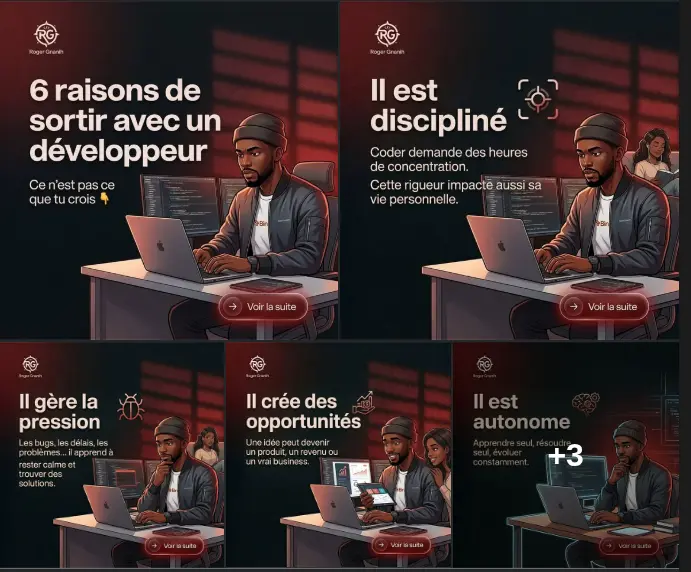
In this article, I show you the complete method to generate a professional cartoon-style carousel, with branding and a clear structure.
Objective
Create a carousel:
- Modern and readable
- Visually consistent
- Suitable for LinkedIn / Facebook
- With your branding
- Generated slide by slide for more control
Step 1: Choose a reference image
It can be your own photo, or you can go on Pinterest and pick a character you like. Then, you download the image.
⚙️ Step 2: Use the right prompt
Here is the complete prompt 👇
Create a premium, modern cartoon-realistic (semi-photorealistic illustration) carousel for social media (Facebook, LinkedIn).

IMPORTANT WORKFLOW:
- Generate ONLY ONE slide at a time.
- Start with SLIDE 1.
- Wait for my instruction before generating the next slide.
- When I say "next", generate the following slide.
- Continue step by step until all slides are completed.
- Do NOT generate multiple slides at once.

Use the provided reference image for layout, composition, lighting, and typography hierarchy.

STYLE & ART DIRECTION:
- Clean cartoon-realistic illustration (not childish)
- Black characters (African), expressive and natural
- Premium, modern, startup-level design
- Dark theme (charcoal/black background)
- Main accent color: deep red (#872323)
- Subtle glow effects, soft lighting, slight bloom
- Minimalist tech background (gradients, grids, abstract UI shapes)
- Balanced composition: text on left, character/scene on right
- Glassmorphism and soft UI elements where relevant

TEXT & TYPOGRAPHY:
- Bold sans-serif for titles (large, impactful)
- Smaller clean sans-serif for descriptions
- Short, clear, readable text (mobile optimized)
- No emojis: use modern line icons instead
- Perfect text hierarchy (title > subtitle)

BRANDING:
- Add a minimal logo “RG” (top left)
- Add name “Roger Gnanih” under the logo
- Keep branding subtle but consistent across all slides

CONTENT STRUCTURE:

SLIDE 1 (HOOK):
Title: "6 reasons to date a developer"
Subtitle: "It's not what you think 👇"

Scene:
Black male developer at desk with multiple screens, focused but calm, cinematic lighting.

---

SLIDE 2 (DISCIPLINE):
Title: "He is disciplined"
Subtitle: "Coding requires hours of concentration. That rigor shows in his life."

Sce
Step 3: Generating slide by slide
Once the prompt is sent:
- The AI generates Slide 1
- You type: next
- It generates the next one
- You continue until the end
Benefits:
- better control
- easy corrections
- much cleaner result
Step 4: Remove Gemini logo
You will go to this site: https://pilio.ai/gemini-watermark-remover
- you upload each of the images, it will erase the Gemini watermark/logo
Result
With this method you can:
- create content quickly
- get a premium look
- build a strong brand image
- attract clients and opportunities
Conclusion
Today, the difference is no longer only about skills...
But about how you present them.
And this type of carousel clearly makes the difference.